RaiseNow
User management
A permission model for every org size
- Role
- Product Designer
- Year
- 2024 – 26
The problem
RaiseNow serves nonprofits at both ends of the scale: single-account clubs and multi-tenant NGOs running dozens of regional accounts. One permission model covered both, so some users were over-privileged and others locked out of work they were accountable for.
What I did
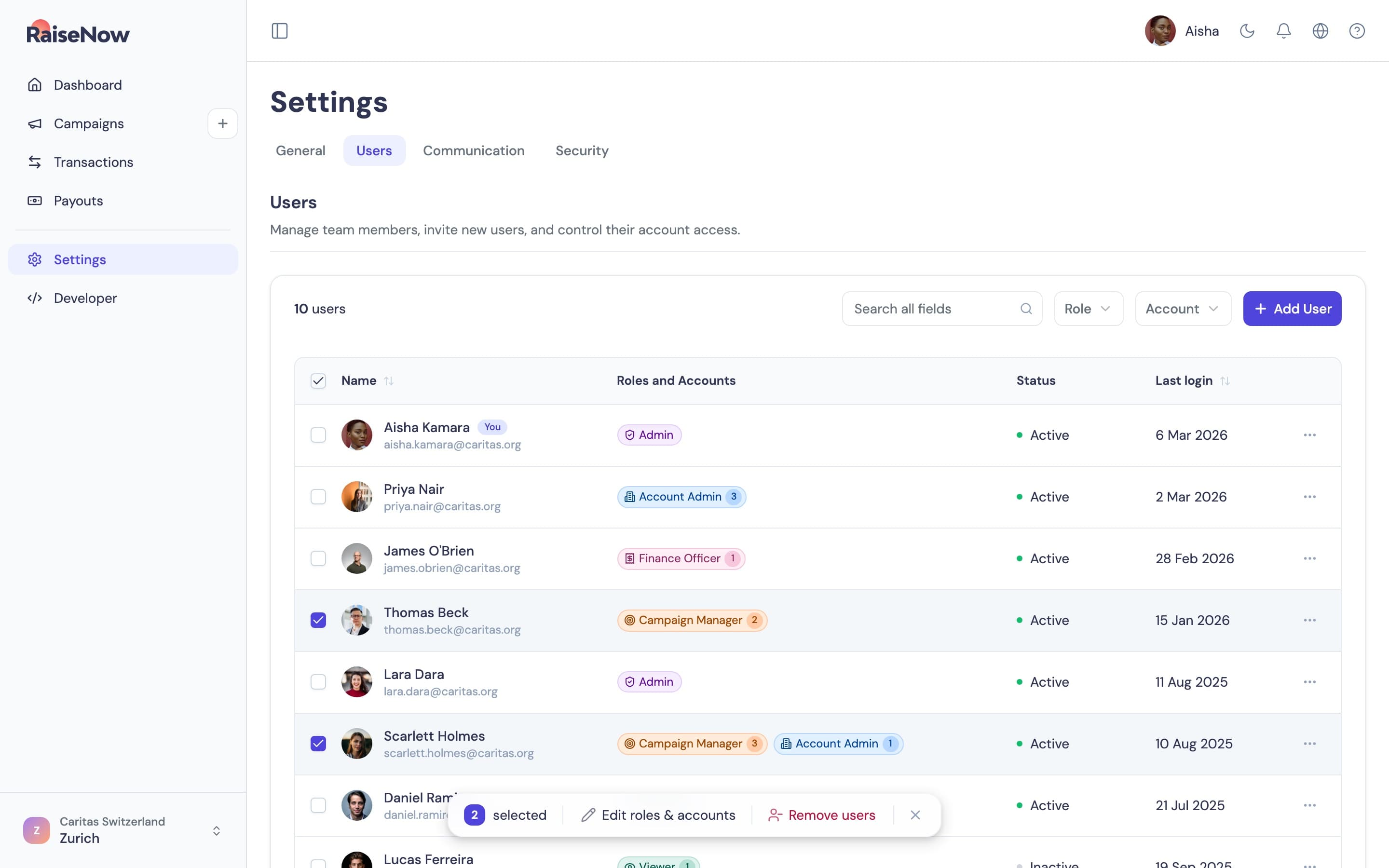
I designed the permission model and the three screens that manage it: the users table, the invite modal and the detail panel. Most of the work went into making a complex model easy to read and change. The clips are from a prototype I built by directing Figma Make and Claude Code.
Six roles
I interviewed enterprise customers and our customer success team to map how access was actually used. From that came six roles, each scoped per account. A Developer role came out of an interview rather than the brief. It covers webhooks and API credentials, which connect other software to RaiseNow, and explicitly not refunds. Finance Officer kept supporter data because support agents troubleshoot with it.
- Admin
- Account Admin
- Campaign Manager
- Finance Officer
- Viewer
- Developer
| Permission | Admin | Account Admin | Campaign Manager | Finance Officer | Viewer | Developer |
|---|---|---|---|---|---|---|
| Touchpoint solutions | ||||||
| View touchpoint solutions | Allowed | Allowed | Allowed | Allowed | Allowed | Allowed |
| Manage touchpoint solutions | Allowed | Allowed | Allowed | Not allowed | Not allowed | Not allowed |
| Donations and payments | ||||||
| View transactions | Allowed | Allowed | Allowed | Allowed | Allowed | Allowed |
| Export transactions | Allowed | Allowed | Allowed | Allowed | Not allowed | Allowed |
| Process refunds | Allowed | Allowed | Allowed | Allowed | Not allowed | Not allowed |
| View supporter data | Allowed | Allowed | Allowed | Allowed | Allowed | Allowed |
| Payouts | ||||||
| View payouts | Allowed | Allowed | Allowed | Allowed | Allowed | Allowed |
| Export payouts | Allowed | Allowed | Allowed | Allowed | Not allowed | Allowed |
| Settings | ||||||
| View organisation info | Allowed | Allowed | Allowed | Allowed | Allowed | Allowed |
| Modify organisation info | Allowed | Not allowed | Not allowed | Not allowed | Not allowed | Not allowed |
| Manage communications | Allowed | Allowed | Allowed | Not allowed | Not allowed | Not allowed |
| View users | Allowed | Allowed | Allowed | Not allowed | Not allowed | Not allowed |
| Manage users | Allowed | Not allowed | Not allowed | Not allowed | Not allowed | Not allowed |
| View payment providers | Allowed | Allowed | Allowed | Allowed | Allowed | Allowed |
| Manage payment providers | Allowed | Allowed | Not allowed | Allowed | Not allowed | Not allowed |
| View integrationsGrowth | Allowed | Allowed | Allowed | Allowed | Allowed | Allowed |
| Manage integrationsGrowth | Allowed | Allowed | Not allowed | Not allowed | Not allowed | Allowed |
| View webhooks and APIsGrowth | Allowed | Allowed | Not allowed | Not allowed | Allowed | Allowed |
| Manage webhooks and APIsGrowth | Allowed | Allowed | Not allowed | Not allowed | Not allowed | Allowed |
Role tags
Each role has its own colour and icon, so you can tell them apart at a glance. Roles are scoped per account, so hovering a tag opens a popover with the accounts it covers. Filtering works on the same tags: the chips above the table are the filter.
Invites
The invite modal works on the same model. Each role in the picker says what it covers, and every role is paired with an account. Several people can be invited in one go.
Bulk edits
Tick two or more people and a floating bar offers to edit their roles and accounts or remove them together.
Changing access
A person's detail panel shows their roles and accounts as a summary. Change access turns it into an editor with one row per role and account, so one pairing can change without touching the rest.